Some links on this page are affiliate links. If you sign up through one, we may earn a commission at no extra cost to you. It never changes our verdict. Details.
People search for systeme.io examples for one reason: to find out whether pages built on it look amateur. The fair answer is that they look like their template, and the templates are plain but competent. Nothing about a systeme.io page announces itself to a visitor, because pages publish on your own domain with no platform branding, even on the free plan. Below is where to see real output and what each type of build contains.
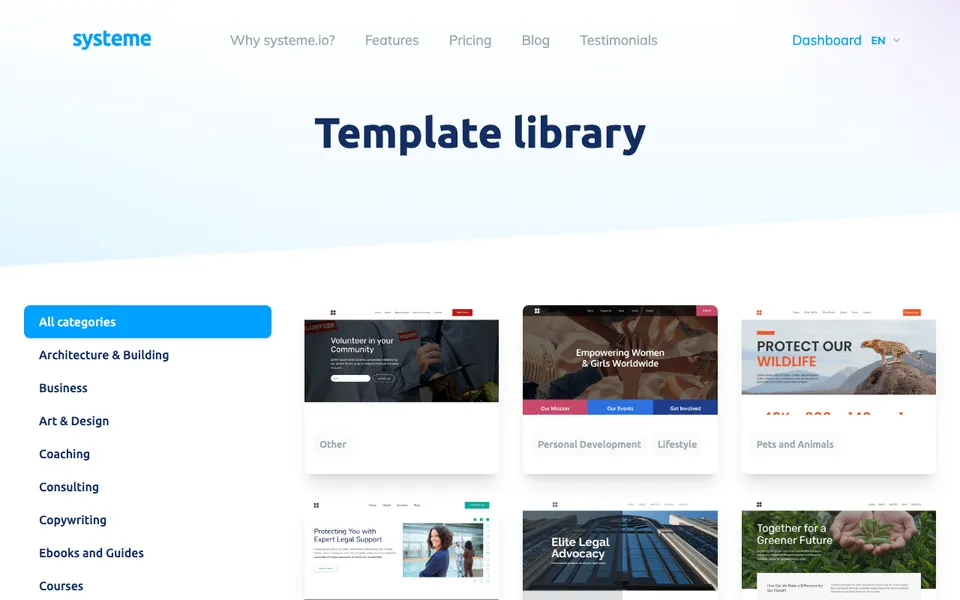
The template library is the best example set
systeme.io publishes its template library openly, filterable by category, and every template has a live preview. That is the most honest way to judge the platform: you are looking at exactly what you would get, not a designer’s mock-up. There is also a separate free-templates library with downloadable funnel templates you can import.
Preview five or six before signing up. If none of them look like something you would put your name on, this is the wrong tool and no review will change that.
Example types and what each contains
Coach or consultant site. Home page with a promise and a booking button, an about page, a services page, and a newsletter form. Four pages, one call to action repeated.
Lead magnet funnel. An opt-in page with no navigation, a thank-you page delivering the file, and an email sequence behind it. The most common build on the platform and the one the landing page guide walks through.
Course launch funnel. Opt-in, a sales page, an order form with a bump, a thank-you page granting course access, and a sequence. Four steps of the fifteen the free plan allows.
Membership site. A sales page, a subscription checkout, a gated course area, and a community, covered on the membership site guide.
Author or creator site. Book or product pages, an about page, and a reader magnet form, usually with the store pointing at a checkout on the same domain.
What a systeme.io site looks like from the outside
It looks like a website. Pages load on your custom domain, there is no systeme.io badge in the footer, and nothing in the URL gives the platform away. The giveaway to a trained eye is the template: the section layouts repeat across the library, so two businesses that picked the same starting point and changed little will resemble each other. Changing the fonts, the colours, and the section order fixes that in twenty minutes.
How to copy a template
Open the library, preview a template, and select it. Selecting requires an account, and the free plan works for this. From there you edit blocks in place, delete the ones you do not need, and publish. The systeme.io templates page covers where the libraries live and which are free.
Affiliate link. Free plan, no card; we earn a commission if you later upgrade.
Frequently asked questions
Where can I see systeme.io examples?
The public template library at systeme.io/templates, which has live previews of every template, and a separate free-templates library with downloadable funnels.
Do systeme.io pages show the platform branding?
No. Pages publish on your own custom domain with no systeme.io badge, including on the free plan.
Do systeme.io sites look professional?
They look like their template. The designs are plain but clean, and changing the fonts, colours, and section order removes the stock feel.
Can I use a systeme.io template on the free plan?
Yes. Selecting a template needs an account, and the free plan qualifies.
Related: systeme.io templates, coaching landing page examples.